


Download Filelist Creator – Free File Management Tool for Windows (Secure, Fast, Lightweight)
Looking for a fast, lightweight, and free file management tool for Windows? Filelist Creator is a powerful yet simple utility designed to help users generate detailed file lists from any folder or directory. Whether you're organizing digital archives, backing up data, or auditing file structures, this tool streamlines the process with minimal effort.
Developed by Stefan Trost Media, Filelist Creator is a no-frills application that runs smoothly on Windows 10 and above. At just 1.4 MB, it’s one of the smallest file management tools available—ideal for users who value speed and efficiency without bloat. The software is completely free, with no hidden costs or ads, making it a secure choice for personal and professional use.
With support for customizable file list exports (TXT, CSV, HTML), it’s perfect for users who need structured data for documentation, sharing, or further processing. No installation required—just download, run, and start creating file lists instantly. Its intuitive interface ensures even beginners can use it with confidence.
Keep your digital workspace organized with a tool that does exactly what it promises—create file lists—without distractions.
Key Features of Filelist Creator (Why It Stands Out)
Filelist Creator delivers a focused set of features that prioritize simplicity and functionality. One of its standout features is the ability to generate comprehensive file lists from any folder or subfolder with just a few clicks. The tool supports multiple export formats, including plain text (.txt), comma-separated values (.csv), and HTML, making it easy to integrate with spreadsheets, databases, or documentation tools. Whether you're a student managing research files, a photographer organizing image libraries, or an IT professional auditing system folders, this flexibility ensures your data is always in the right format.
Another major advantage is its lightweight design. At only 1.4 MB, Filelist Creator loads instantly and consumes minimal system resources—ideal for older PCs or environments where performance matters. Unlike bulky file managers, it doesn’t require installation, meaning you can run it from a USB drive or portable storage, making it perfect for on-the-go use.
The interface is clean and minimal, with no clutter or unnecessary menus. You simply select a folder, choose your export format, and let the tool do the rest. It supports recursive scanning, so all subfolders and files are included in the output, ensuring no file is missed.
Additionally, Filelist Creator allows you to customize the output with options like including file size, date modified, file type, and full paths. This level of detail is invaluable for audits, backups, or inventory tracking. The tool also handles large directories efficiently, processing thousands of files without crashing. With no ads, no telemetry, and no in-app purchases, it remains a trusted, secure option for users who value privacy and transparency. Whether you're a casual user or a power user, Filelist Creator offers a reliable, no-nonsense solution for file listing tasks.
How to Install and Use Filelist Creator on Windows
One of the biggest advantages of Filelist Creator is its hassle-free setup. Since it’s a portable application, there’s no traditional installation process. To get started, simply download the .zip file from the official source or trusted platforms like Softonic.
Once downloaded, extract the contents to a folder of your choice—your desktop, documents folder, or even a USB drive. You’ll find a single executable file named FilelistCreator.exe. Double-click it to launch the application.
No admin rights or system permissions are required, which makes it ideal for restricted environments like school labs or office computers.
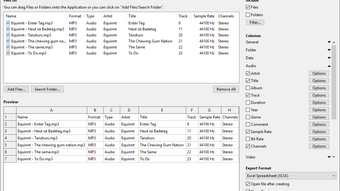
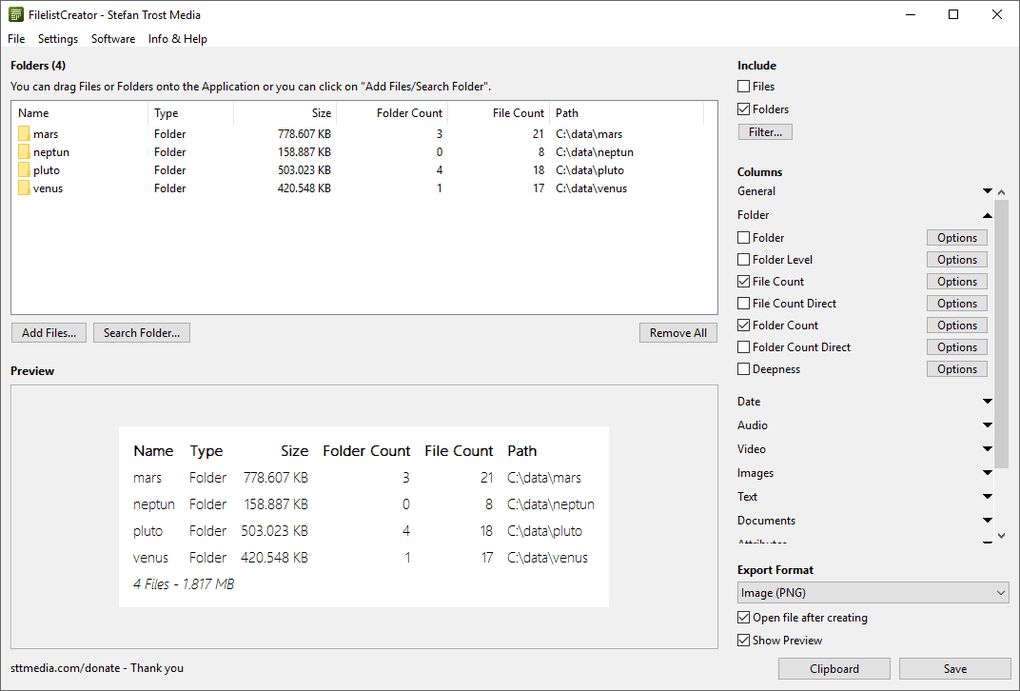
Upon launching, the main window presents a straightforward interface. Click the “Browse” button to select the folder you want to analyze. You can choose a single folder or an entire drive.
Once selected, you can customize your file list output by checking or unchecking options such as File Name, Size, Date Modified, File Type, and Full Path. You can also choose the export format: Text (.txt), CSV, or HTML. After configuring your preferences, click “Create List” to begin the scanning process.
Filelist Creator will scan the selected directory and generate a detailed list in the chosen format. The output file is saved to your specified location, and you can open it immediately with Notepad, Excel, or a web browser (for HTML). For advanced users, the CSV output can be imported into databases or used in automation scripts.
The entire process takes seconds, even for large folders. There’s no need to learn complex commands or use command-line tools—everything is done through the intuitive GUI. After use, you can close the app and delete the files if needed, or keep the portable version for future use.
It’s a perfect tool for one-time tasks or recurring file audits.
Compatibility and System Requirements
Filelist Creator is designed exclusively for Windows operating systems and requires Windows 10 or later to run. It’s compatible with both 32-bit and 64-bit versions of Windows, ensuring broad accessibility across modern PCs and laptops. The application is lightweight and optimized for performance, so even systems with limited RAM or older processors can run it smoothly. With a file size of just 1.4 MB, it won’t take up valuable disk space or slow down your machine.
As a portable app, Filelist Creator doesn’t rely on registry entries or background services. This means it won’t interfere with your system’s stability or privacy. It’s also safe to use on work or school computers where software installation is restricted. The tool runs entirely from memory and doesn’t require administrator privileges, making it ideal for shared or locked-down environments. While it’s not available on the Microsoft Store, it’s still a secure download when obtained from reputable sources like Softonic or the developer’s official site.
Currently, Filelist Creator is only available in English. However, its simple interface and minimal text make it easy to use regardless of language proficiency. The software has not been updated since version 20.1.15 (released in 2020), which may raise concerns about long-term support. However, given its stable nature and minimal functionality, it remains reliable for basic file listing tasks. For users who need more advanced features, third-party tools may be necessary—but for most users, Filelist Creator offers everything they need in a compact, secure package.
Pros and Cons: Is Filelist Creator Right for You?
- Pros: Lightweight (1.4 MB), fast performance, no installation required, supports multiple export formats (TXT, CSV, HTML), customizable output, secure and ad-free, portable, ideal for audits and backups.
- Cons: No updates since 2020, limited to Windows only, no GUI for advanced settings, no multi-language support, not available on Microsoft Store.
Frequently Asked Questions (FAQ)
Is Filelist Creator free to download and use?
Yes, Filelist Creator is completely free to download and use. There are no hidden fees, subscriptions, or in-app purchases. The software is distributed under a free license and is safe to use for personal, educational, and professional purposes.
Can I use Filelist Creator on Windows 11?
Yes, Filelist Creator is fully compatible with Windows 11. It requires Windows 10 or later, so it runs smoothly on all modern Windows systems, including Windows 11 and Windows 10.
Does Filelist Creator support subfolders?
Yes, the tool supports recursive scanning, meaning it automatically includes all files and subfolders within the selected directory. This ensures a complete file list without missing any nested content.
Can I export file lists in CSV format?
Absolutely. Filelist Creator allows you to export your file list in CSV format, which can be easily opened in Microsoft Excel, Google Sheets, or imported into databases for further analysis.
Is Filelist Creator safe to download?
Yes, when downloaded from trusted sources like Softonic or the official developer site, Filelist Creator is safe and free from malware, ads, or spyware. Its small size and portable nature reduce security risks.
Final Verdict: A Reliable, Lightweight Tool for File Listing
Filelist Creator is a no-frills, high-efficiency tool that excels at one thing: generating detailed file lists. If you need to document folder contents, prepare for backups, or audit digital assets, this software delivers exactly what it promises—fast, secure, and simple. Its lightweight design, portability, and support for multiple export formats make it a standout choice among file management tools.
While it hasn’t seen updates since 2020, its core functionality remains stable and reliable. For users who value privacy, speed, and minimalism, Filelist Creator is a smart, free solution that works without complications. If you’re looking for a secure, fast, and lightweight way to organize your files, download Filelist Creator today and simplify your file management workflow.
CTA: Download Filelist Creator Now – Free, Secure, and Lightweight







